Today I’m posting Part 4 of the Tracing Without Tears series, which focuses on tracing for print and cut. I go through a half dozen representative examples including a cut file that has already been traced, a decoupage sheet, and several styles of clip art.
Archives for 2013
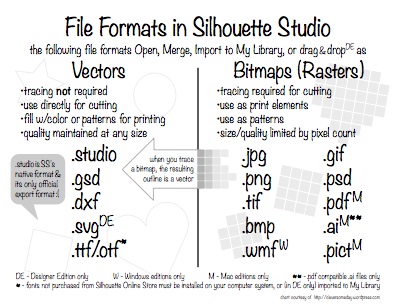
Cheat Sheet: File Formats in Silhouette Studio
It turns out that the question about what file formats Silhouette Studio can use is not all that easy to answer, partly because the facts vary quite a bit from the official Silhouette America information. Your file format cheat sheet for V2 is here.
Part 3 … Tracing Without Tears
Part 3 of Tracing Without Tears is ready. This edition covers how to trace line art, and how to work with the trace results to get the kind of cuts you want using Silhouette Studio.
Exporting custom templates to SSDE (Win only)
While working on my tracing series, I was reminded just how hard it is to autotrace templates. Wouldn’t it be nice to not have to trace them? I thought, and then it hit me. I went back to a 3 year old post here and found my answer. Here’s a video that shows the process for Windows (Mac solution and alternate Windows process here).
Part 2 … Tracing Without Tears
The response to my first video has been overwhelming! I so appreciate your kind comments and welcome all my new YouTube subscribers! It seems I struck a nerve for those of you whose learning style challenges you to understand what is behind the steps you are taking.
Tracing Without Tears … a new video series
I’m very excited to be releasing Part 1 of my series of videos about tracing in Silhouette Studio. It’s a new approach I hope will help ease some frustration. In Part 1 I cover why and when you need to trace, what are the best kinds of images to trace, how to do a basic trace, and how to avoid the “double line” problem.
Double-sided print and cut in SS
Once you’ve mastered print and cut with the Silhouette, the next logical step is double-sided print and cut.